如何向 HUSKY SEO URL 页面添加 JSON-LD 结构化标记
问题
出于安全原因,HUSKY 产品筛选器中的“SEO URL 请求”字段会对 <script> 标签进行转义,从而阻止直接插入用于 Google 富媒体搜索结果的 JSON-LD 结构化数据(架构标记)。
解决方案概述
与其将完整的 JSON-LD 代码直接插入 SEO 文本字段,不如在 HUSKY 后台使用架构键名(schema key),并将实际的 JSON-LD 代码存放在单独的文件或 functions.php 中。
方法一:静态 JSON 文件(推荐用于简单架构)
步骤 1:创建架构文件文件夹
- 导航到
/wp-content/uploads/ - 创建新文件夹:
json-ld-schemas
步骤 2:创建 JSON 架构文件
- 创建类似
category1.json、products.json等的文件 - 在每个文件中添加纯 JSON-LD 代码(不要包含
<script>标签):{ "@context": "https://schema.org", "@type": "CollectionPage", "name": "Product Category", "description": "Category description" }
步骤 3:将以下代码添加到 functions.php:
add_action('init', function () {
    $url_request = WOOF_EXT::$includes['applications']['url_request'];
    remove_filter('woocommerce_after_shop_loop', array($url_request->seo, 'add_seo_text'), 99999);

    add_filter('woocommerce_after_shop_loop', function () use ($url_request) {
        $rule = $url_request->seo->check_search_rules();
        if (!isset($rule['text']) || !$url_request->seo->do_index()) {
            return;
        }

        $schema_key = apply_filters('woof_seo_text', $url_request->seo->replace_vars($rule['text'], $url_request->seo->get_current_replace_vars()));

        if (!empty($schema_key)) {
            $upload_dir = wp_upload_dir();
            $schemas_dir = $upload_dir['basedir'] . '/json-ld-schemas/';
            $schema_file = $schemas_dir . $schema_key . '.json';

            if (file_exists($schema_file)) {
                $json_content = file_get_contents($schema_file);
                echo '<div class="woof_seo_text"><script type="application/ld+json">' . $json_content . "</script></div>\r\n";
            }
        }
    }, 99999);
}, 1);
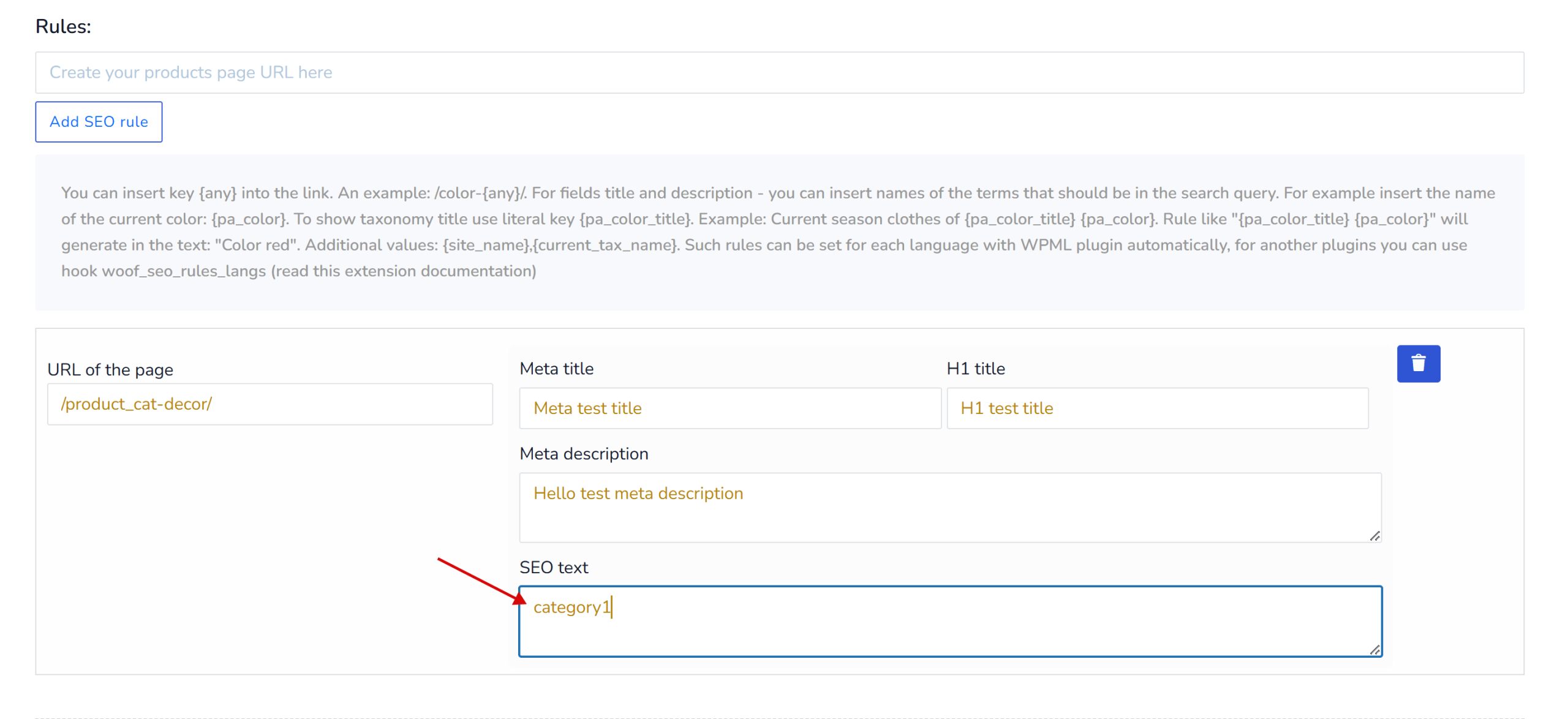
步骤 4:在 HUSKY 后台(SEO URL 请求 → SEO 文本字段)
- 只需输入架构键名(例如
category1) - 不要输入完整的 JSON-LD 代码
方法二:动态 PHP 文件(适用于动态架构)
步骤 1:在 /wp-content/uploads/json-ld-schemas/ 中创建 PHP 架构文件
示例:category-dynamic.php
<?php
global $wp_query;

$term = get_queried_object();
$category_name = $term ? $term->name : 'Products';
$category_url = get_term_link($term);

$schema = array(
    '@context' => 'https://schema.org',
    '@type' => 'CollectionPage',
    'name' => $category_name,
    'url' => $category_url,
    'description' => term_description($term->term_id),
    'breadcrumb' => array(
        '@type' => 'BreadcrumbList',
        'itemListElement' => array(
            array(
                '@type' => 'ListItem',
                'position' => 1,
                'name' => 'Home',
                'item' => home_url()
            ),
            array(
                '@type' => 'ListItem',
                'position' => 2,
                'name' => $category_name,
                'item' => $category_url
            )
        )
    )
);

return $schema;
步骤 2:将以下代码添加到 functions.php:
add_action('init', function () {
    $url_request = WOOF_EXT::$includes['applications']['url_request'];
    remove_filter('woocommerce_after_shop_loop', array($url_request->seo, 'add_seo_text'), 99999);

    add_filter('woocommerce_after_shop_loop', function () use ($url_request) {
        $rule = $url_request->seo->check_search_rules();
        if (!isset($rule['text']) || !$url_request->seo->do_index()) {
            return;
        }

        $schema_key = apply_filters('woof_seo_text', $url_request->seo->replace_vars($rule['text'], $url_request->seo->get_current_replace_vars()));

        if (!empty($schema_key)) {
            $upload_dir = wp_upload_dir();
            $schemas_dir = $upload_dir['basedir'] . '/json-ld-schemas/';
            $schema_file = $schemas_dir . $schema_key . '.php';

            if (file_exists($schema_file)) {
                $schema_data = include($schema_file);
                $json_output = json_encode($schema_data, JSON_UNESCAPED_UNICODE | JSON_UNESCAPED_SLASHES | JSON_PRETTY_PRINT);
                echo '<div class="woof_seo_text"><script type="application/ld+json">' . $json_output . "</script></div>\r\n";
            }
        }
    }, 99999);
}, 1);
使用示例
在 HUSKY 后台:
- 进入“SEO URL 请求”设置
- 为特定的筛选组合创建规则
- 在“SEO 文本”字段中只需输入:
category-dynamic(或任意键名) - 保存
结果:
- 架构文件
/wp-content/uploads/json-ld-schemas/category-dynamic.php将被加载 - JSON-LD 会正确呈现在页面源码中
- Google 可以读取并验证该结构化数据
重要提示
- 仅在 HUSKY 后台的 SEO 文本字段中使用键名(例如
products、category1) - 切勿将完整的 JSON-LD 代码直接粘贴到 HUSKY 后台
- 静态架构 → 使用
.json文件 - 动态架构 → 使用返回数组的
.php文件 - 修改后清除缓存
验证
实施后,验证您的架构:
- 访问您网站的已筛选页面
- 复制页面 URL
- 在 https://search.google.com/test/rich-results 测试
- 检查是否有错误