How to Add JSON-LD Schema Markup to HUSKY SEO URL Pages
Problem
The “SEO URL request” field in HUSKY filters <script> tags for security reasons, preventing direct insertion of JSON-LD structured data (schema markup) for Google rich results.
Solution Overview
Instead of inserting full JSON-LD code directly into the SEO text field, use schema keys in HUSKY admin and store the actual JSON-LD code in separate files or functions.php.
Method 1: Static JSON Files (Recommended for Simple Schemas)
Step 1: Create schema files folder
- Navigate to
/wp-content/uploads/ - Create new folder:
json-ld-schemas
Step 2: Create JSON schema files
- Create files like
category1.json,products.json, etc. - Inside each file, add pure JSON-LD code (without
<script>tags):{ "@context": "https://schema.org", "@type": "CollectionPage", "name": "Product Category", "description": "Category description" }
Step 3: Add this code to functions.php:
add_action('init', function () {
    $url_request = WOOF_EXT::$includes['applications']['url_request'];
    remove_filter('woocommerce_after_shop_loop', array($url_request->seo, 'add_seo_text'), 99999);

    add_filter('woocommerce_after_shop_loop', function () use ($url_request) {
        $rule = $url_request->seo->check_search_rules();
        if (!isset($rule['text']) || !$url_request->seo->do_index()) {
            return;
        }

        $schema_key = apply_filters('woof_seo_text', $url_request->seo->replace_vars($rule['text'], $url_request->seo->get_current_replace_vars()));

        if (!empty($schema_key)) {
            $upload_dir = wp_upload_dir();
            $schemas_dir = $upload_dir['basedir'] . '/json-ld-schemas/';
            $schema_file = $schemas_dir . $schema_key . '.json';

            if (file_exists($schema_file)) {
                $json_content = file_get_contents($schema_file);
                echo '<div class="woof_seo_text"><script type="application/ld+json">' . $json_content . "</script></div>\r\n";
            }
        }
    }, 99999);
}, 1);
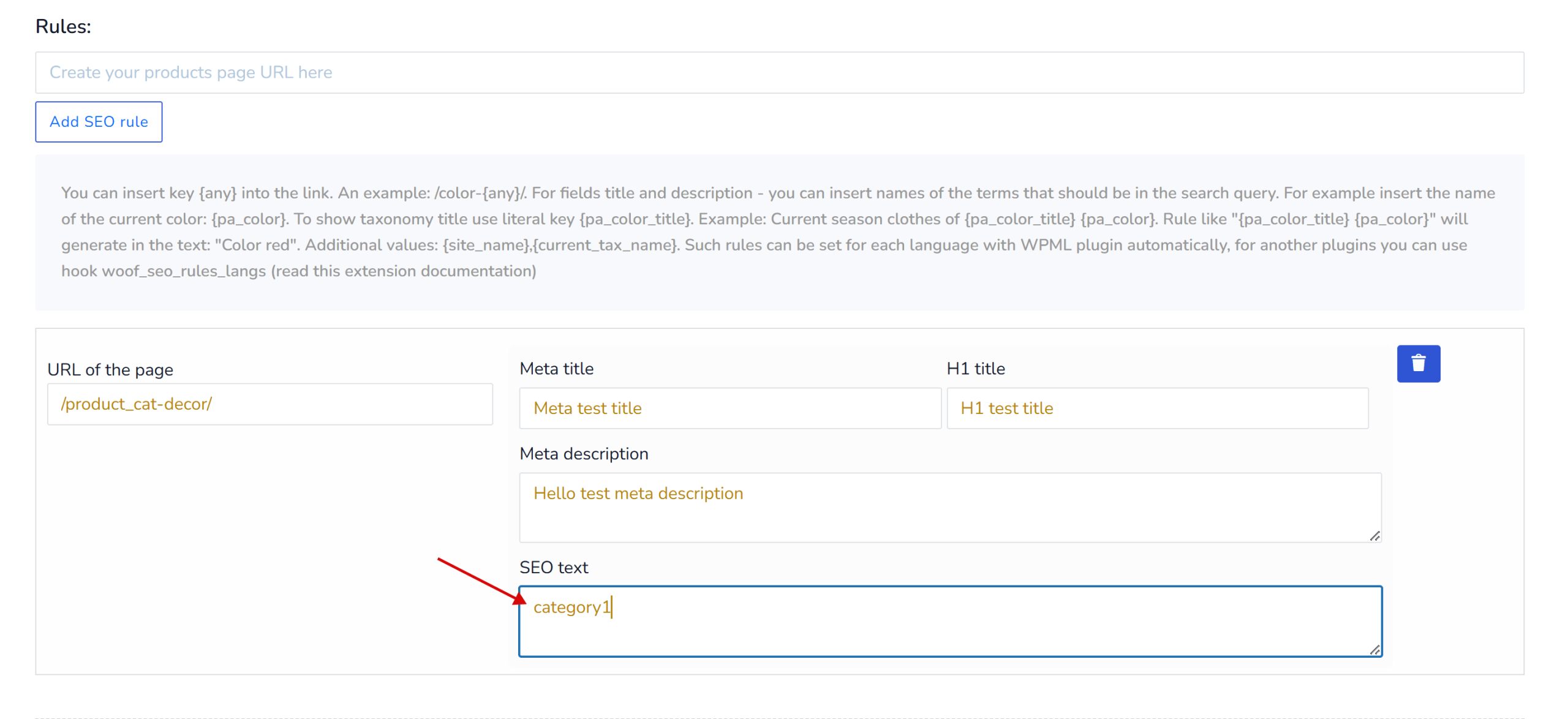
Step 4: In HUSKY admin (SEO URL request → SEO text field)
- Enter only the schema key (e.g.,
category1) - Do NOT enter the full JSON-LD code
Method 2: Dynamic PHP Files (For Dynamic Schemas)
Step 1: Create PHP schema files in /wp-content/uploads/json-ld-schemas/
Example: category-dynamic.php
<?php
global $wp_query;

$term = get_queried_object();
$category_name = $term ? $term->name : 'Products';
$category_url = get_term_link($term);

$schema = array(
    '@context' => 'https://schema.org',
    '@type' => 'CollectionPage',
    'name' => $category_name,
    'url' => $category_url,
    'description' => term_description($term->term_id),
    'breadcrumb' => array(
        '@type' => 'BreadcrumbList',
        'itemListElement' => array(
            array(
                '@type' => 'ListItem',
                'position' => 1,
                'name' => 'Home',
                'item' => home_url()
            ),
            array(
                '@type' => 'ListItem',
                'position' => 2,
                'name' => $category_name,
                'item' => $category_url
            )
        )
    )
);

return $schema;
Step 2: Add this code to functions.php:
add_action('init', function () {
    $url_request = WOOF_EXT::$includes['applications']['url_request'];
    remove_filter('woocommerce_after_shop_loop', array($url_request->seo, 'add_seo_text'), 99999);

    add_filter('woocommerce_after_shop_loop', function () use ($url_request) {
        $rule = $url_request->seo->check_search_rules();
        if (!isset($rule['text']) || !$url_request->seo->do_index()) {
            return;
        }

        $schema_key = apply_filters('woof_seo_text', $url_request->seo->replace_vars($rule['text'], $url_request->seo->get_current_replace_vars()));

        if (!empty($schema_key)) {
            $upload_dir = wp_upload_dir();
            $schemas_dir = $upload_dir['basedir'] . '/json-ld-schemas/';
            $schema_file = $schemas_dir . $schema_key . '.php';

            if (file_exists($schema_file)) {
                $schema_data = include($schema_file);
                $json_output = json_encode($schema_data, JSON_UNESCAPED_UNICODE | JSON_UNESCAPED_SLASHES | JSON_PRETTY_PRINT);
                echo '<div class="woof_seo_text"><script type="application/ld+json">' . $json_output . "</script></div>\r\n";
            }
        }
    }, 99999);
}, 1);
Usage Example
In HUSKY Admin:
- Go to “SEO URL request” settings
- Create a rule for specific filter combination
- In “SEO text” field, enter only:
category-dynamic(or any key name) - Save
Result:
- The schema file
/wp-content/uploads/json-ld-schemas/category-dynamic.phpwill be loaded - JSON-LD will be properly rendered in the page source
- Google can read and validate the structured data
Important Notes
- Use keys only in HUSKY admin SEO text field (e.g.,
products,category1) - Never paste full JSON-LD code directly into HUSKY admin
- For static schemas → use
.jsonfiles - For dynamic schemas → use
.phpfiles that return array - Clear cache after making changes
Validation
After implementation, validate your schema:
- Visit the filtered page on your site
- Copy the page URL
- Test at: https://search.google.com/test/rich-results
- Check for errors