Обновление WooCommerce Product Filter v.2.1.6
- Исправлено: миграция сайта теперь работает корректно, а настройки WOOF могут быть перенесены вместе со всеми компонентами сайта
- Fixed: {{ urlPrefix }}/filtering-by-product-attribute-doesn-work/ исправлено программно
- Fixed: ошибка с выбранным элементом в мобильном представлении
- Новое расширение: Статистика – {{ urlPrefix }}/extencion/statistic/
- New extension: Радиокнопки или флажки в выпадающем списке – {{ urlPrefix }}/extencion/radio-or-checkbox-drop-down/
- New extension: По рейтингу – {{ urlPrefix }}/extencion/by-rating/
- синхронизация функциональности WOOF с нативным виджетом WooCommerce "СРЕДНИЙ РЕЙТИНГ"
- Новая функция: – Сворачиваемые термины – "Несвернутые счетчики терминов" для: цвета, радиокнопок, флажков, меток, изображений
Введите количество видимых терминов, чтобы остальные сделать сворачиваемыми. Появится кнопка "Показать больше". Эта функция хорошо подходит для радиокнопок, флажков, меток, цветов. Слова можно изменять даже на изображениях с помощью: {{ urlPrefix }}/hook/woof_get_more_less_button_xxxx/
Запрос от клиента: Может ли WOOF использовать сворачиваемые категории, как на http://www.newegg.ca/Processors-Desktops/SubCategory/ID-343
Было бы очень, очень полезно иметь таксономии/атрибуты либо свернутыми по умолчанию, либо параметр настройки, который говорит "развернуть первые XX", где ввод 0 означает, что все свернуты. Есть только несколько мест на страницах WooCommerce, где можно указать боковую панель, и это означает, что опция выбора таксономии (фильтр товаров) в боковой панели быстро заполнится десятками возможных вариантов (на сайте, над которым я работаю, будет около тысячи товаров с множеством десятков различных атрибутов в наборах, уникальных для группы товаров). Если не свернуть все, кроме нескольких, боковая панель станет совершенно неуправляемой по длине, поскольку каждый атрибут обычно имеет несколько возможных вариантов, пока пользователь не углубится в конкретную категорию товара, и количество атрибутов не уменьшится.
- New feature: в виджете WOOF: "Скрыть форму поиска по умолчанию и показать одну кнопку вместо нее" – Пользователь на фронтенде сайта должен будет нажать кнопку типа "Показать форму фильтра товаров", чтобы загрузить форму поиска через ajax и начать фильтрацию. Хорошая функция, когда форма поиска довольно большая, и загрузка страницы занимает больше времени из-за нее!
- Новый атрибут: в шорткоде [woof start_filtering_btn=1]
- New feature: {{ urlPrefix }}/save-selected-filter-in-session-of-website/
- New feature: для иерархического выпадающего списка по синтаксису заголовка: Страна дистрибьюторов+Город дистрибьюторов^Мои локации дистрибьюторов
- Новый шорткод: [woof_found_count] – {{ urlPrefix }}/shortcode/woof_found_count/
- Новая опция: для расширения "Поиск по тексту": Как открывать ссылки с постами в предложениях
- Новый хук: "woof_print_content_before_search_form" – {{ urlPrefix }}/hook/woof_print_content_before_search_form/
- New hook: "woof_start_filtering_btn_txt" {{ urlPrefix }}/hook/woof_start_filtering_btn_txt/
- New feature: новый вид для фильтра цены [woof_price_filter type=”text”] – теперь его можно представить в виде 2 текстовых полей ввода
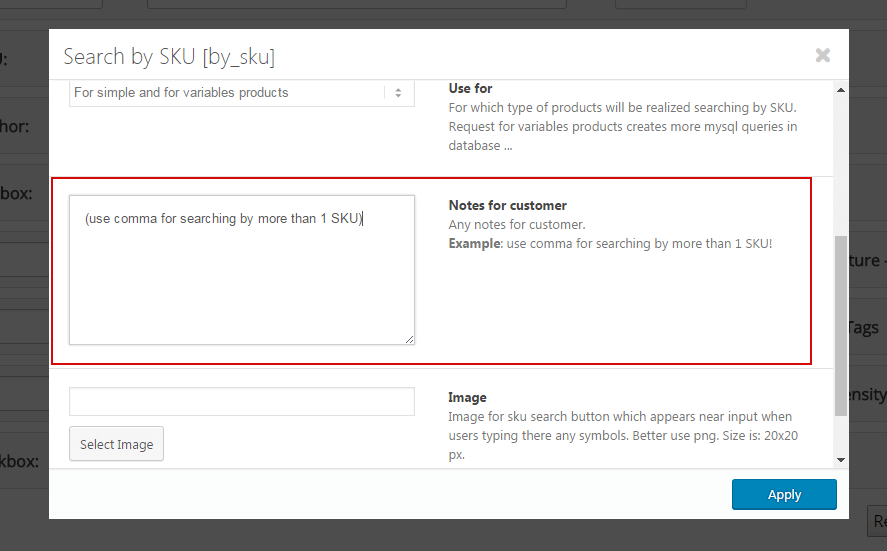
{{ urlPrefix }}/shortcode/woof_price_filter/ - Улучшенное расширение SKU – теперь пользователь может использовать запятую для поиска товаров с разными SKU одновременно
Запрос от клиента: "Я хочу искать по нескольким SKU. У нас автомобильный веб-сайт, у нас есть собственный внутренний выпадающий список поиска по комплектации, который перенаправляет на обычный поиск, и мы передаем несколько SKU, соответствующих автомобилю. Я заметил ваш поиск по SKU, но, кажется, он позволяет вводить только один SKU за раз, есть ли способ искать несколько SKU одновременно?"